
iPhone・iPad・Android の遅延再生カメラ

振り向けば、
数秒前の自分。

置いたカメラが、数秒遅れの映像を出し続けます。技のあと、スイングのあと、画面を見に行くだけで自分のフォームが見られます。テレビやプロジェクターに大きく映してチームで見る、止めてスローで見返す、線と角度を重ねる、良かった1本だけを写真に残す、まで1つのアプリで。

App Store・Google Play で配信予定

買い切りで全部の機能が使えます。登録・アプリ内課金・サブスクリプション・広告はありません。通信もしません。
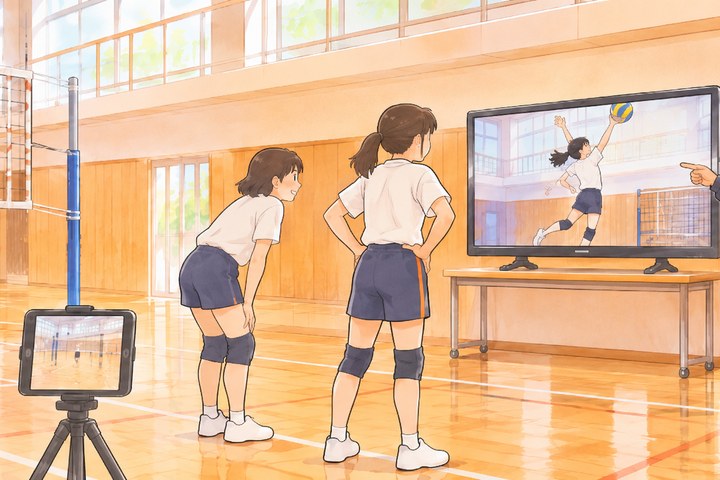
体育館で、スパイクを打ち終えた選手2人とコーチが、壁のテレビに映った数秒前のスパイクを見ている。手前に三脚に立てたタブレット

こんな困りごとのために

縦でしか映せない・テレビで小さい

縦にも横にも。AirPlay や HDMI でつなぐと、テレビには遅れた映像だけを全面に映します。手元の操作はそのまま使えます。

画質を上げると落ちる・遅れが縮む

映像はその場で小さくまとめて端末のメモリに溜め、決めた秒数ぶん前を取り出して流します。端末に合わせた「最長の遅れ」を先に出すので、超える設定は選べません。

録画できない・残せない

[いまのを残す]で、直前の 10・30・60 秒を写真に保存。見返しの画面では、始めと終わりを選んで残せます。

ボタンが邪魔で隠せない

練習中は操作を全部隠します。触ったときだけ出て、3秒で消えます。

広角が使えない

後ろの広角(0.5×)も前のカメラも選べます。狭い場所でも全身が入ります。

線や角度で確かめたい

直線と角度の線を、練習中の映像にも見返しにも重ねられます。角度は数字で出ます。

できること

遅らせる1秒きざみで遅らせて流し続ける・よく使う 3・5・10・20 秒・後ろ/広角/前のカメラ・縦と横・左右反転(鏡の代わり)・画質 720p/1080p/4K
見返す直前の60秒を止めて見る・コマ送り・½× と ¼× のスロー・区間を選んで写真に残す・写真の動画を読みこんで見返す
線直線と角度(3点・角度の数字)。練習中にも見返しにも
テレビAirPlay や HDMI(Android はキャストや HDMI)でつなぐと、テレビには遅れた映像だけ
リモコンApple Watch から[いまのを残す][見返す]・遅れの変更。Bluetooth のリモコンでも
そのほか画面を消さない・iPad と iPhone Duo の広い画面・通信しない

使い方・プライバシーポリシーもご覧ください。

Video delay camera for iPhone, iPad and Android

Turn around and see
yourself seconds ago.

Set the camera down and it keeps showing the video a few seconds late. After a move or a swing, just look at the screen to see your form. Show it big on a TV for the team, pause and review in slow motion, draw lines and angles, and save only the good rep to Photos, all in one app.

Coming to the App Store and Google Play

One-time purchase unlocks everything. No sign-up, in-app purchases, subscriptions or ads. It never connects to the internet.

In a gym, two volleyball players and their coach watch a wall TV replaying the spike from a few seconds ago, with a tablet on a tripod in the foreground

Built for these problems

Portrait only, tiny on the TV

Portrait or landscape. Connect with AirPlay or HDMI and the TV shows only the delayed video, full screen. Your controls keep working.

Crashes or shrinking delay at high quality

Video is compressed on the fly into your device's memory and played back exactly the chosen seconds later. The longest delay for your device is shown up front, so you can't pick more than it can hold.

Can't record or keep anything

Save Last 10, 30 or 60 seconds to Photos. In Review, pick a start and end and save just that clip.

Buttons in the way

During practice every control hides. Tap to show them; they fade after 3 seconds.

No wide angle

Choose the back wide (0.5×) or the front camera, so your whole body fits even in tight spaces.

Want lines and angles

Draw lines and angles over the live delay or in Review. Angles show in degrees.

What it does

DelayContinuous delay in 1-second steps, quick 3, 5, 10 and 20 s, back / wide / front camera, portrait or landscape, Mirror, 720p / 1080p / 4K
ReviewPause the last 60 seconds, step frame by frame, ½× and ¼× slow motion, save a clip to Photos, review videos from Photos
LinesLines and angles (3 points, in degrees), live or in Review
On a TVAirPlay or HDMI (cast or HDMI on Android) shows only the delayed video
RemoteSave Last and Review from Apple Watch, plus delay changes. Bluetooth remotes work too
AlsoScreen stays on, wide layouts on iPad and iPhone Duo, no internet

See Help and the Privacy Policy.